Your boards, beautifully arranged.
Choose favorites from your Pinterest boards and bring them together in a desktop mood board that feels like you.
YOUR PINTEREST. YOUR EVERYDAY.
Turn your Pinterest boards into personal desktop mood boards. Pick your favorite Pins, find your layout, and keep your inspiration in view.
Every feature. Free for everyone.



01 / FIND YOUR FEELING
Start with the boards you love.
Then give it a little space to breathe.
Original generated sample artwork. This preview never changes your desktop.
MADE FROM YOUR PINTEREST BOARDS
Bring together favorites from your own Pinterest boards and arrange them into a desktop mood board that feels like you. Keep your next big idea, dream destination, or favorite colors in view throughout your day.
Mix in images from your Mac to make every mood board your own.
02 / A FEW SIMPLE THINGS
Connect Pinterest, browse your boards, and choose the images you want on your desktop.
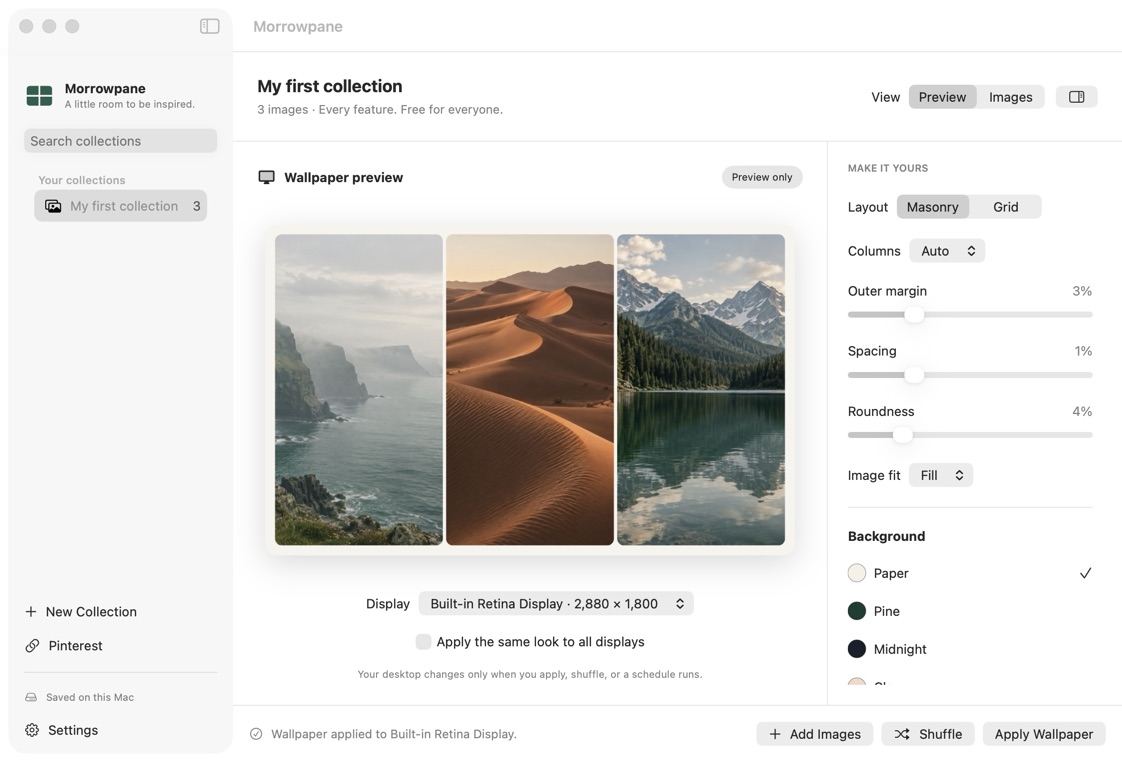
Try a layout, choose a background, and leave a little room for your icons.
Preview first. Apply to a display. Shuffle whenever you need a new perspective.
03 / THOUGHTFULLY AT HOME
Just enough control to make something yours.
Nothing getting in the way.
Choose favorites from your Pinterest boards and bring them together in a desktop mood board that feels like you.
Choose grid or masonry. Set the spacing, corners, background, and room for desktop icons.
Preview the result, choose your display, and apply when it feels right.
Shuffle by hand or let a schedule change things while Morrowpane is running.
Your imported images live on your Mac. Local collections need no Morrowpane account.
Opt into private iCloud to keep your collections across Macs using your Apple storage.
YOUR COLLECTION IS PERSONAL
Your library stays on your Mac and, when you choose, in your private iCloud database.
We don’t run a server that receives your image library. No advertising or analytics SDKs. Optional Pinterest sign-in uses a small authentication service.
Read our privacy approachA FEW GOOD QUESTIONS
Yes. All app features are free, with no paid tiers or subscription. Optional iCloud sync uses your existing Apple storage allowance.
No Morrowpane account is needed for local collections. iCloud uses the account signed in on your Mac. Pinterest requires a separate optional connection.
Yes, with images already imported on your Mac. iCloud sync and Pinterest browsing wait for an internet connection.
Yes. Connect your Pinterest account, choose images from your boards, and arrange them into a mood board for your desktop. Adjust the layout, spacing, and background to make it yours. You can also add images from your Mac.
No. Automatic changes pause during sleep and Low Power Mode. On wake, the app performs at most one overdue change while running.
Morrowpane is in internal TestFlight testing. There is no public download yet. The download page explains current availability.
A LITTLE ROOM TO BE INSPIRED